 柠檬班
柠檬班 Cucumber 第一个小案例
本文目录
上一篇我们已经介绍了如何在idea环境下运行cucumber,还没有看的同学,点击@@ARTICLE:1619775632529@@ 查看。
1、cucumber集成testng
上一篇我们已经介绍了如何在idea环境下运行cucumber,还没有看的同学,点击/articles/8900000000000000600/ 查看。
言归正传,进入本篇文章的主题,如何使用cucumber写一个测试代码。使用cucumber写测试代码最大的好处就是没代码人员也能看懂你要干什么,接下来就一步一步带大家领略cucumber的魅力。
本次案例采用testng做集成,当然你可以用Junit。
1.1、导入坐标
<dependency>
    <groupId>io.cucumber</groupId>
    <artifactId>cucumber-java</artifactId>
    <version>6.8.1</version>
    <scope>test</scope>
</dependency>

<dependency>
    <groupId>io.cucumber</groupId>
    <artifactId>cucumber-testng</artifactId>
    <version>6.8.1</version>
</dependency>

<dependency>
    <groupId>org.seleniumhq.selenium</groupId>
    <artifactId>selenium-java</artifactId>
    <version>3.141.59</version>
</dependency>
前两个是cucumber,第三个等会要用到了selenium,猜猜看接下来会出现什么骚操作。
1.2、编写feature文件
Feature: 使用chrome浏览器访问百度搜索柠檬班论坛

  Scenario: 百度搜索testingpai
    Given 打开百度搜索
    When 输入 "testingpai"
    Then 显示 "柠檬班 - 测试派"
feature文件是cucumber实现BDD中最重要一环,是新老测试对话的桥梁,看懂feature文件你就知道对方在测什么,怎么测的。
Feature:描述测试功能
Scenario:测试场景,如:登录成功,登录失败。
Given:表示测试开始了
When:描述一个动作或事件
Then:断言
有了上述了解,上面的feature文件内容就能翻译为:使用chrome浏览器打开百度搜索,输入 "testingpai"点击搜索,是不是有"柠檬班 - 测试派"。
1.3、代码
1.3.1、启动类
@CucumberOptions(
        features = {"src/test/resources/lemon2.feature"},
        glue = "com.lemon.steps",
        monochrome = true
)
public class LemonRunner extends AbstractTestNGCucumberTests {
}
类似与testng中的测试类,通过testng.xml启动。
CucumberOptions注解
features属性:feature文件位置
glue属性:Steps类包名
monochrome:输出更详细的测试格式。
1.3.2、Steps类
public class LemonSteps {
    static {
        //设置chrome驱动位置
        System.setProperty("webdriver.chrome.driver","src/test/resources/chromedriver.exe");
    }

    //定义WebDriver对象
    private final WebDriver driver = new ChromeDriver();

    @Given("打开百度搜索")
    public void open() throws Exception {
        driver.get("https://www.baidu.com");
        Thread.sleep(2000);
    }

    @When("输入 {string}")
    public void searchElement(String query) {
        WebElement element = driver.findElement(By.name("wd"));
        // 输入 testingpai
        element.sendKeys(query);
        // 点击搜索
        element.submit();
    }

    @Then("显示 {string}")
    public void check(final String title) {
        new WebDriverWait(driver,5).until(
                ExpectedConditions.visibilityOfElementLocated(
                        By.xpath("//a[text()='"+title+"']")));
    }

    @After()
    public void closeBrowser() throws Exception {
        Thread.sleep(3000);
        driver.quit();
    }
}
1.3.3、testng.xml
<?xml version="1.0" encoding="UTF-8"?>

<suite name="futureloan" >
    <test name="登录测试">
        <classes>
            <class name="com.lemon.runner.LemonRunner"></class>
        </classes>
    </test>
</suite>
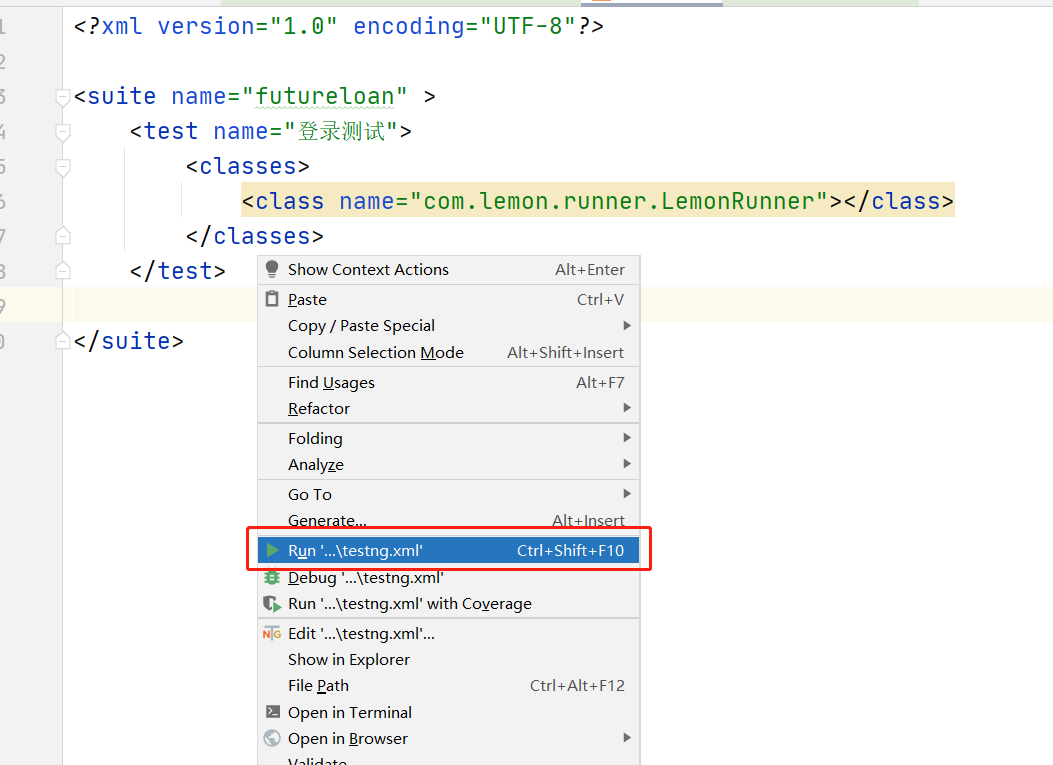
1.3.4、如何启动,测试结果
右键点击testng.xml 运行就ok了。
输出内容:
五月 27, 2021 5:44:43 下午 org.openqa.selenium.remote.ProtocolHandshake createSession
信息: Detected dialect: W3C


┌───────────────────────────────────────────────────────────────────────────────────┐

│ Share your Cucumber Report with your team at https://reports.cucumber.io          │
│ Activate publishing with one of the following:                                    │
│                                                                                   │
│ src/test/resources/cucumber.properties:          cucumber.publish.enabled=true    │
│ src/test/resources/junit-platform.properties:    cucumber.publish.enabled=true    │
│ Environment variable:                            CUCUMBER_PUBLISH_ENABLED=true    │
│ JUnit:                                           @CucumberOptions(publish = true) │
│                                                                                   │
│ More information at https://reports.cucumber.io/docs/cucumber-jvm                 │
│                                                                                   │
│ Disable this message with one of the following:                                   │
│                                                                                   │
│ src/test/resources/cucumber.properties:          cucumber.publish.quiet=true      │
│ src/test/resources/junit-platform.properties:    cucumber.publish.quiet=true      │
└───────────────────────────────────────────────────────────────────────────────────┘

===============================================
futureloan
Total tests run: 1, Passes: 1, Failures: 0, Skips: 0
===============================================
来源:testingpai