 柠檬班
柠檬班 Vue2️⃣
本文目录
在vue中,如果我们需要通过一个或多个数据来计算出来另一个数据,应该怎么去做? 比如:根据用户选择商品的数量来计算商品的总价格。这个时候我们就可以通过计算属性来实现。

二、高级特征
1、计算属性 computed
在vue中,如果我们需要通过一个或多个数据来计算出来另一个数据,应该怎么去做? 比如:根据用户选择商品的数量来计算商品的总价格。这个时候我们就可以通过计算属性来实现。
优点:缓存

<div class="app">
    <p>价格: <input type="text" v-model="price"></p>
    <p>数量: <input type="text" v-model="number"></p>
    <p>总金额: "{{ sumPrice }}"</p>
</div>

<script>
    const vm = new Vue({
        el : '.app',
        data : {
            number:3,
            price:2
        },
        computed: {
            //ES6 方法简写
            sumPrice() {
                return this.number * this.price
            }
        },
    })
</script>

===================完整写法===================
    <script>
        const vm = new Vue({
            el : '.app',
            data : {
                number:3,
                price:2
            },
            computed: {
                //ES6 方法简写
                sumPrice: {
                    get() {
                        console.log('get调用了')
                        return this.number * this.price
                    },
                    set() {
                        console.log('修改计算属性')
                        this.number = 2
                    }
                }
            },
        })
    </script>
2、侦听器-watch
Vue 提供了一种更通用的方式来观察和响应 Vue 实例上的数据变动:侦听器 在vue中可以使用watch来定义侦听器,案例如下:
    <div class="app">
        <p>价格: <input type="text" v-model="price"></p>
        <p>数量: <input type="text" v-model="number"></p>
        <p>总金额: "{{ sumPrice }}"</p>
    </div>

    <script>
        const vm = new Vue({
            el : '.app',
            data : {
                number:3,
                price:2
            },
            computed: {
                //ES6 方法简写
                sumPrice() {
                    return this.number * this.price
                }
            },
            watch: {
                //oldValue可选
                number(newValue,oldValue) {
                    if(newValue < 0) {
                        console.log("别乱来")
                        this.number = oldValue
                    }
                },
                sumPrice(newValue,oldValue) {
                    if(newValue > 1000) {
                        console.log("你太有钱了")
                    }
                }
            }
        })
    </script>
===================完整写法===================
    <script>
        const vm = new Vue({
            el : '.app',
            data : {
                number:3,
                price:2
            },
            computed: {
                //ES6 方法简写
                sumPrice() {
                    return this.number * this.price
                }
            },
            watch: {
                number: {
                    handler(newValue,oldValue) {
                        console.log(newValue,oldValue)
                    }
                }
            }
        })
    </script>
扩展:深度监视
扩展:过滤器-filters
3、vue生命周期钩子
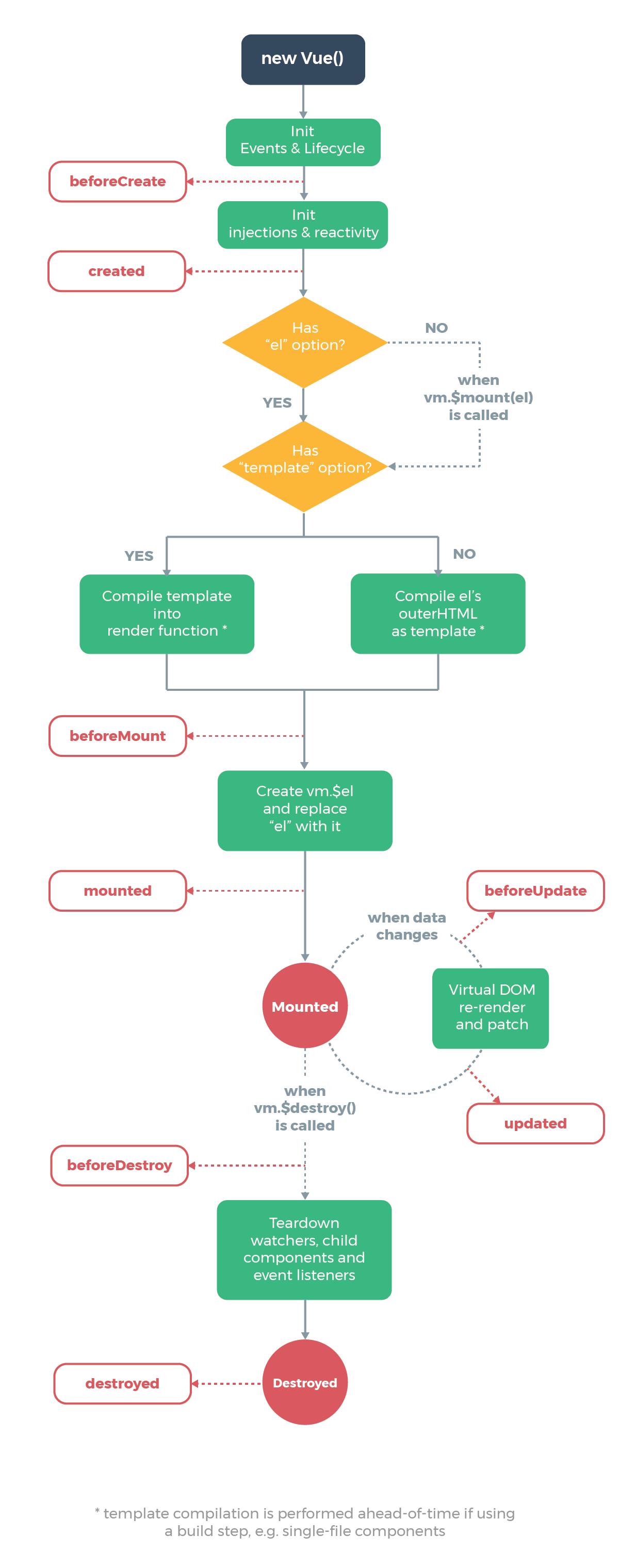
更多的钩子函数扩展学习,请参照官网文档:https://cn.vuejs.org/v2/api/#beforeCreat
重点:
created():在页面DOM加载前,该方法会被调用;一般作一些数据初始化,或从后端拉取数据的操作会在此方法中处理
mounted():挂载,在页面DOM加载后,该方法会被调用,一般用在需要动态修改元素时;但尽量不要这么做,违背了Vue.js数据驱动的原则
beforeDestroy(): 实例销毁之前调用。在这一步,实例仍然完全可用。
<script>
    const vm = new Vue({
        el : '.app',
        data : {
            number:3,
            price:2
        },
        computed: {
            //ES6 方法简写
            sumPrice() {
                return this.number * this.price
            }
        },
        watch: {
            number: {
                handler(newValue) {
                    console.log(newValue)
                }
            }
        },
        created() {
            console.log("created被调用");
        },
        mounted() {
            console.log("mounted被调用");
        },
        beforeDestroy() {
            console.log("beforeDestroy被调用");
        }
    })
</script>
三、组件化开发
1、什么是组件
用来实现局部功能的代码集合(html、css、js)
通常一个应用会以一棵嵌套的组件树的形式来组织:
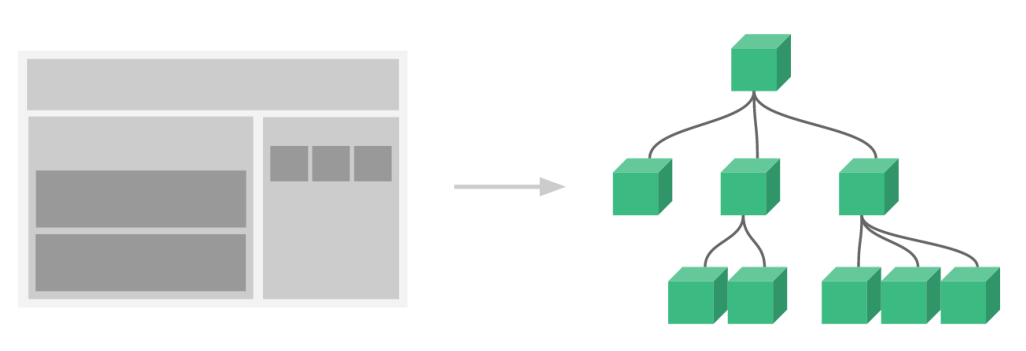
例如,你可能会有页头、侧边栏、内容区等组件,每个组件又包含了其它的像导航链接、博文之类的组件。
2、为什么用组件?
维护性、简化代码、提高运行效率
3、使用组件
1、创建组件
const school = Vue.extends({

    //data 必须写成函数形式
    data() {
        return {
            name:'柠檬班',
            address:'长沙'
        }
    }
})

const student = Vue.extends({
    //data 必须写成函数形式
    data() {
        return {
            name:'luoji',
            age:20
        }
    }
})
2、注册组件
const vm = new Vue({
    el : '.app',
    //注册组件
    components : {
        //组件名:组件对象
        school:school,	//简写:school
        student:student
    }
})
3、模版
<div class="app">
    <school></school>
<hr>
    <student></student>
</div>

<script>
    const school = Vue.extend({
        //必须在外面套一个div
        template: `
<div>
<h1>学校名称:{{name}}</h1>
<h1>学校地址:{{address}}</h1>
</div>`,
        //data 必须写成函数形式
        data() {
            return {
                name:'柠檬班',
                address:'长沙'
            }
        }
    })

const student = Vue.extend({
    //组件模板
    template: `
<div>
<h1>学生名称:{{name}}</h1>
<h1>学生年龄:{{age}}</h1>
</div>`,
    //data 必须写成函数形式
    data() {
        return {
            name:'luoji',
            age:20
        }
    }
})

const vm = new Vue({
    el : '.app',
    components : {
    	//局部组件
        //组件名:组件对象
        school:school,
        student:student
    }
})

</script>
4、组件嵌套
<div class="app">
        <app></app>
    </div>

    <script>
        const school = Vue.extend({
            template: `
            <div>
                <h1>学校名称:{{name}}</h1>
                <h1>学校地址:{{address}}</h1>
            </div>`,
            //data 必须写成函数形式
            data() {
                return {
                    name:'柠檬班',
                    address:'长沙'
                }
            }
        })

        const student = Vue.extend({
            //组件模板
            template: `
            <div>
                <h1>学生名称:{{name}}</h1>
                <h1>学生年龄:{{age}}</h1>
            </div>`,
            //data 必须写成函数形式
            data() {
                return {
                    name:'luoji',
                    age:20
                }
            }
        })

        const app = Vue.extend({
            //组件模板
            template: `
            <div>
                <student></student>
                <hr>
                <school></school>
            </div>`,
            components : {
                //组件名:组件对象
                school,
                student
            }
        })

        const vm = new Vue({
            el : '.app',
            components : {
                //组件名:组件对象
                app
            }
        })

    </script>
4、单文件组件
后续讲vue-cli的时候详细讲解
1、index.html
<!DOCTYPE html>
<html lang="">
	<head></head>
    <body>
        <div id="app">
        	<App></App>
        </div>
	<script src="vue.js"></script>
	<script src="main.js"></script>
    </body>
</html>
2、main.js
import App from './App.vue'

new Vue({
    el:'#app',
    components : {App},
})
3、App.vue
<template>
    <div>
    	<School></Student>
    	<Student></School>
    </div>
</template>

<script>
	import School from './components/School.vue'
    import Student from './components/Student.vue'

    export default {
      name: 'App',
      components : {School,Student},

    }
</script>

<style>

</style>
4、components
School.vue
<template>
	<div>
    	<h1>学校名称:{{name}}</h1>
		<h1>学校地址:{{address}}</h1>
	</div>
</template>

<script>

    export default {
      name: 'School',
      data() {
          return {
              name:'柠檬班',
              address:'长沙'
          }
      }
    }
</script>

<style>

</style>
Student.vue
<template>
	<div>
    	<h1>学生名称:{{name}}</h1>
        <h1>学生年龄:{{age}}</h1>
	</div>
</template>

<script>

    export default {
      name: 'Student',
      data() {
          return {
              name:'luoji',
              age:18
          }
      }
    }
</script>

<style>

</style>
来源:testingpai